THU PHAM - ARTIST

THU PHAM - ARTIST


DETAILS

15 people
32 weeks
Unreal Engine
PC
Software used: Procreate, Photoshop, Stubstance Painter, Substance Sampler, After Effect
Roles: Texture/UI/2D Artist
Responsibilities:
-
Textured 30+ models.
-
Created environment material sets.
-
Designed characters.
-
Produced concept art.
-
Created skybox asset.
-
Designed 2D art assets.
-
Created UI screens.
-
Designed UI elements.
-
Produced marketing materials
-
Created VFX assets.
Trailer
Cinematic Screenshots
Working on the Rockstar project allowed me to grow as an artist by immersing myself in a unique retro '70s vibe with a cartoonish style, combined with space travel and music themes. In this role, I took on full responsibility for bringing color and atmosphere to the game through texturing models, designing VFX assets, building UI elements, and crafting skyboxes. My primary goal was to create a cohesive, vibrant visual experience that enhanced gameplay while staying true to the creative direction.
This experience sharpened my skills in color theory, consistency, and theme-based design, all of which are essential in game art. It was a great opportunity for me to understand how visuals impact player engagement and deepen my commitment to creating immersive game worlds. This hands-on growth in both technical skill and artistic vision has equipped me to contribute effectively to any game art team.


TEXTURE WORKS
Software: Substance Painter, Photoshop
In my texturing work, I honed my skills in Substance Painter, focusing on achieving a balanced cartoon style with subtle realistic details. I learned how to create vibrant, engaging textures that maintain a stylized aesthetic without feeling flat or overly detailed. I also developed reusable smart materials, saving time and enhancing project efficiency. Additionally, I mastered adding intricate surface details—like zippers, seams, and buttons—without increasing geometry, optimizing both visual quality and performance. Throughout the process, I improved my use of passthrough folders, anchor layers, and other advanced techniques, deepening my understanding of performance-conscious design.
Character & Enemy
Textured all enemies in the game, including the Bear, Shroombo, Ergs, Mother Ergs, and others. Also responsible for texturing all NPCs and player characters.


Environment & Prop
Textured all environmental assets in the canyon, including mushrooms, sand, and roots. Handled 90% of the cave textures, covering emissive plants and mushrooms. In High as Kite, textured stars, rainbow, and planets. For the Sporrest map, created most mushroom textures, including the smoke-emitting black mushroom. Also textured all prop items across maps, including jump collectibles, band-aid, and weapons.


UI ASSETS
Software: Procreate, Photoshop, Illustrator
I created UI assets by combining space-themed visuals with '70s hippie motifs and musical elements to establish a cohesive and stylized aesthetic. Throughout the process, I faced several design challenges—such as maintaining clarity during gameplay, balancing visual style with readability, and aligning skill icons with in-game instrument models. Each challenge required thoughtful iteration and feedback sessions with the Art Director to ensure consistency and usability. This project helped me grow in both creative problem-solving and collaborative design within a stylized game environment.


The images below display the in-game implementation of the UI. Alongside the elements presented in the gallery above, additional interface components are visible, including the enemy health bar and the hallucination bar, identifiable by the bear head icon. The boss health bar was also designed as part of this UI system. Each element was created to maintain visual consistency with the game’s overall aesthetic while effectively conveying gameplay information.


Character Potrait
Software: Photpshop, Procreate
For the character portraits, I focus on conveying each character's personality through their pose, as facial expressions are not visible due to helmets. I design the clothing and gear to closely match their in-game character models, ensuring consistency. The poses are carefully crafted to reflect their traits—whether it’s a confident stance, a relaxed posture, or a more intense, focused pose. Small design element such as subtle body language, further emphasize their individual characteristics. This approach ensures that the portraits remain true to the characters and enhance the player's experience during dialogue interactions.


VFX ASSETS
Software: Procreate, Photoshop
My studio requested the VFX to be created as 2D frame-by-frame animations, so my responsibility was to design and animate these effects while ensuring they matched the vibrant, '70s hippie color palette and style. My goal was to use the minimum number of frames to keep the animation smooth and efficient. Each VFX sequence I created had fewer than 10 frames, with most averaging around 5 frames, allowing for a polished, seamless look without sacrificing performance.


Other 2D works and marketing materials
Software: Procreate,Illustrator, Photoshop, After Effect
The workflow began with a discussion of the Art Director’s vision to ensure alignment with the project’s style and tone. Initial sketches were created and iteratively refined based on feedback. Once the composition was approved, base colors were applied, followed by shading, detailing, and regular check-ins to ensure the work stayed on track with the creative direction. To streamline production and maintain visual consistency, a significant amount of artwork was reused across assets. By keeping each component organized in its own layer, elements could be easily repositioned or repurposed as needed. For example, the van—originally created for the loading screen—appears in multiple pieces of art throughout the project. Decorative elements like flowers, peace signs, and other motifs were sourced from pre-made stickers originally designed for texturing, allowing for efficient asset reuse without compromising quality.


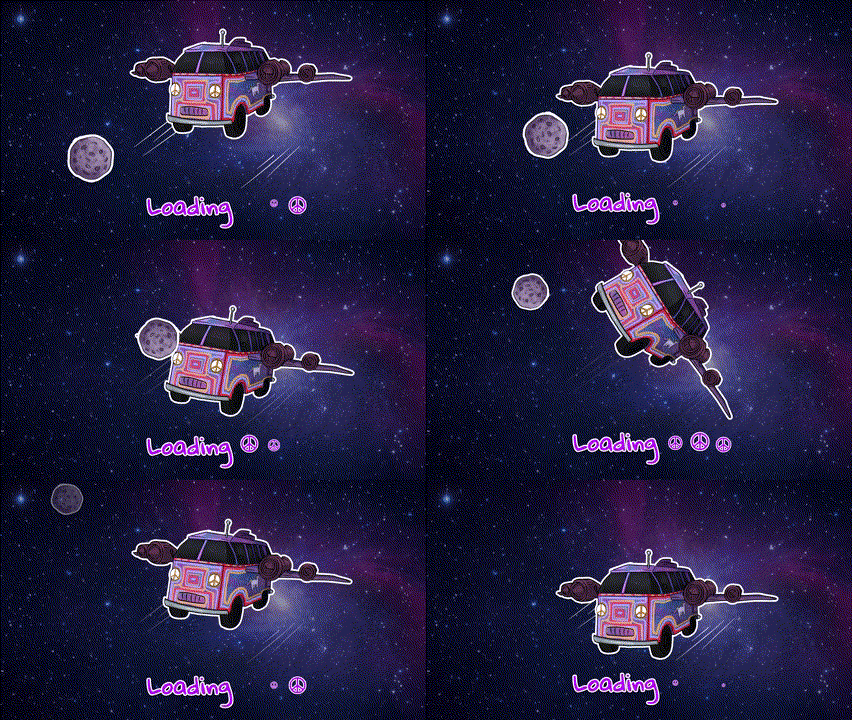
Loading Screen
Software: Procreate, Photoshop, After Effect
Size: 1920 x 1080
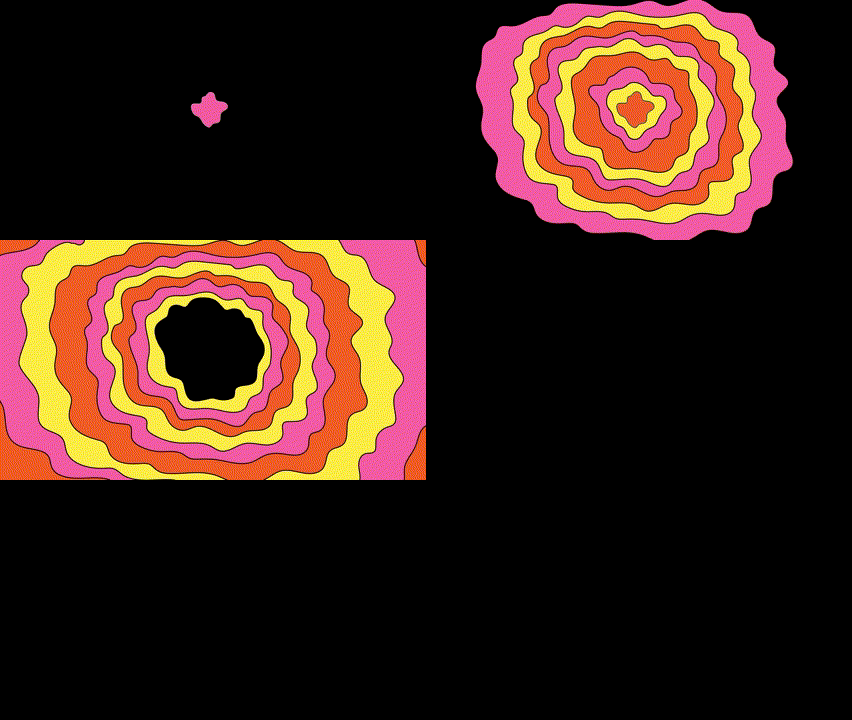
Death Screen
Software: Illlustrator, Photoshop, After Effect
Size: 1920 x 1080
Reflection
Working on Project Rockstars pushed me to grow significantly as both a technical artist and a collaborator. This project helped me become much more efficient in Substance Painter, as I learned new techniques to speed up my process while maintaining quality. I also picked up After Effects for the first time, which opened up new possibilities in motion design and VFX work. Revisiting Illustrator during the project sparked a renewed interest, and I began using it more regularly for creating clean, effective marketing materials. Collaborating closely with the team strengthened my communication and feedback skills, while also teaching me how to adapt my work based on evolving needs. Project Rockstars challenged me to think critically about how visual design enhances gameplay—especially when creating responsive and impactful interface elements. Overall, this experience expanded my versatility as a game artist and deepened my confidence in delivering polished, player-focused assets on a production timeline.


